FigCraft: ArtCraft's Free, Open-Source Figma Alternative
FigCraft is a free Figma-style interface design app from the ArtCraft team. Here is what it can do, what it can't do yet, and how to install it.
By ArtCraft Tips Editorial TeamLast updated 6 min read
FigCraft is a free, open-source interface design app that aims to do what Figma does, without an account or a subscription. It comes from the team behind ArtCraft. Its source code went up on GitHub on October 9, 2026, and by October 16 the repository had more than 1,400 stars.
It is also very new. FigCraft is labeled early alpha, and the team is upfront that it is only about halfway to replacing Figma for real work. This guide covers what it can do today, where it falls short, and how to install it safely.
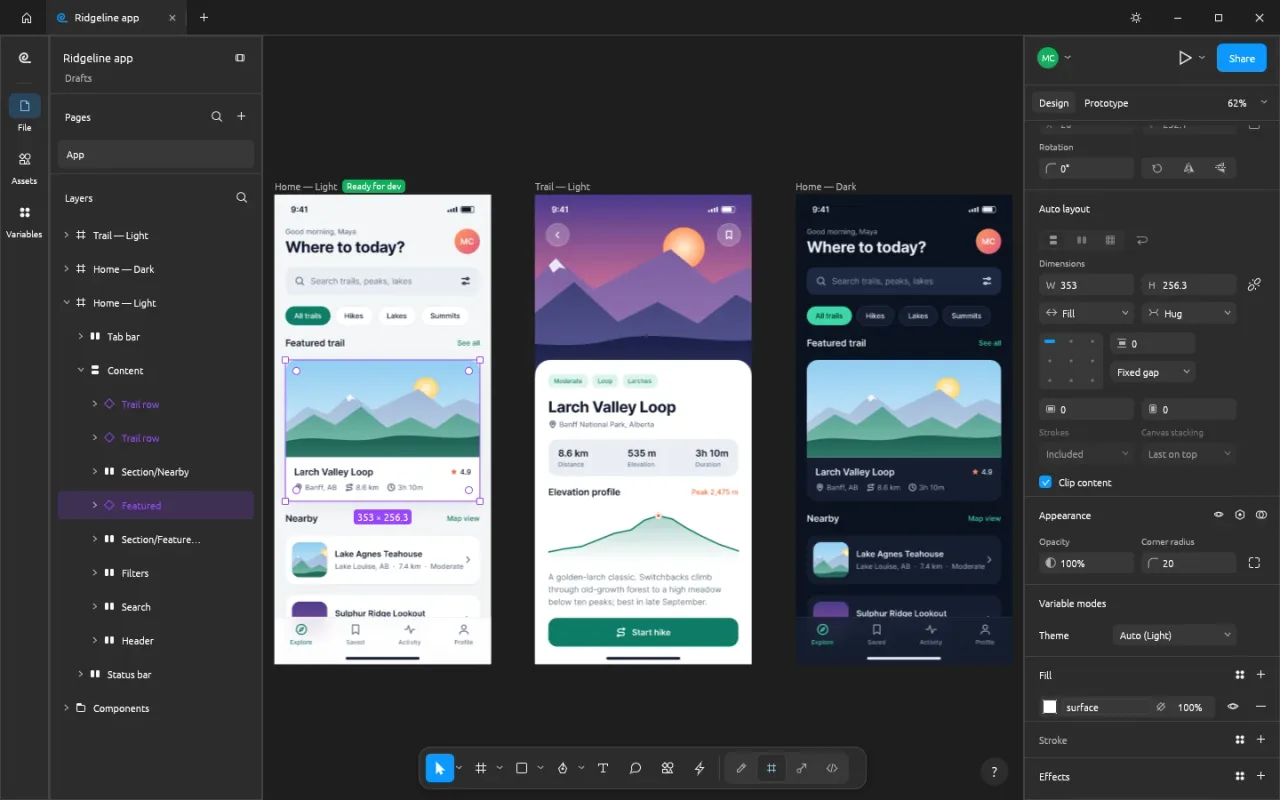
FigCraft at a glance
| Made by | The ArtCraft team, led by Brandon Thomas |
| What it replaces | Figma (not affiliated with Figma, Inc.) |
| Price | Free, no account or subscription |
| License | MIT or Apache-2.0 |
| Latest version | 0.6.0, released October 14, 2026 |
| Status | Early alpha |
| Platforms | macOS, Windows, Linux, FreeBSD, web browser |
| Written in | Pure Rust (no Electron) |
| Source code | github.com/storytold/figcraft |
What FigCraft can do
The official pitch is "interface design, rebuilt in pure Rust." If you know Figma, the toolbar, layers panel, Design panel, menus, and shortcuts should feel familiar.
- Frames and auto layout. Frames with constraints and layout grids, plus auto layout in both directions with wrap and grid, padding, gaps, and Hug, Fill, and Fixed sizing.
- Components and variants. Component sets with variant properties, instances with overrides, and an Assets panel with live thumbnails.
- Styles and variables. Paint, text, effect, and grid styles, plus variables with modes for light and dark themes.
- Vector networks. Pen and pencil tools, editable booleans, variable-width strokes, and smooth corners.
- Prototypes. Connections, triggers, animated transitions, back actions, and a presentation view.
- Dev Mode. Ready-for-dev badges, annotations, measurements, and generated CSS, HTML, React, SwiftUI, and Compose code.
- File formats. Saves
.figcraftarchives on your disk. Opens.figfiles and Figma REST API JSON best effort. Imports and exports SVG, PNG, JPG, WebP, and PDF. - Live sessions (preview). Share the open file for real-time editing with cursors, selections, cursor chat, and spotlight, either on your local network or through a server. Teams can self-host
figcraft-serveron Linux. - Automation. Every menu item and tool runs one of more than 400 commands, which a CLI (
figcraft-cli), a JSON control channel, and an MCP server can call. - In your browser. The whole editor compiles to WebAssembly. The browser build is useful for trying the UI; for opening and saving files, use the desktop app.
- Plugins. Sandboxed WebAssembly plugins that call the same command registry, not Figma's plugin API.
The interface has reviewed English, Russian, and Turkish translations, plus drafts for Spanish, French, German, Brazilian Portuguese, Japanese, Korean, Simplified Chinese, Czech, and Indonesian.
What's new in FigCraft 0.6.0
Version 0.6.0 shipped on October 14, 2026. Highlights from the release notes:
- Starter templates on the home screen: mobile app, landing page, dashboard, design system, wireframe kit, social sizes, slides, and an icon set.
- Online sharing improvements, including remembered ownership, safer crash recovery, and clearer terms for the default server.
- Better
.figexport, covering instance sizes, variables with modes, shared styles, and variable-width strokes. - Core editor polish: wrapped-line alignment, prototype delays and overlay offsets, frame/group convert, effects on groups, and a component playground.
- Windows rendering switched to Direct3D 12 instead of Vulkan.
New versions arrive every few days, so check the releases page for the latest. The official website may lag a release behind GitHub.
How close is FigCraft to Figma?
The team publishes a detailed parity assessment against Figma Design. Figures below are from mid-October 2026:
| Measure | FigCraft |
|---|---|
| Menu/command breadth (does each menu item have a command?) | 100% measured |
| Feature breadth (does each Figma feature exist?) | ~85% |
| Ready for real professional work | ~50–53% |
| Ready for someone who only needs the core features | ~59% |
In the team's words, FigCraft is "about 49% of the way to replacing Figma for real work." The main gaps:
.figfidelity. Opening Figma files works best effort and has not been fully checked against real client files. Experimental.figexport exists, but do not rely on it for round trips yet.- Multiplayer. Live sessions are a first preview. There are no accounts, teams, comments as in Figma, or cloud libraries.
- Plugins. FigCraft runs its own WebAssembly plugins, not Figma's JavaScript plugin ecosystem.
- Depth. Menu items are wired, but that measures presence more than polished behavior on real documents.
Independent write-ups make the same point: Penpot is the more mature open-source option for a team move today, while FigCraft is the closer copy of Figma's look, shortcuts, and .fig files, still in alpha.
FigCraft vs Figma and Penpot
| FigCraft | Figma | Penpot | |
|---|---|---|---|
| Price | Free | Free Starter; paid Professional seats | Free, open source |
| Open source | Yes | No | Yes |
| Figma-style layout and shortcuts | Yes | Yes | Different |
Opens .fig files | Best effort | Native | Via exporter plugin |
| Offline desktop app | Yes | Limited | Self-hosted / desktop options |
| Linux | Yes | Browser / limited | Yes |
| Maturity | Early alpha | Mature | Mature (2.x) |
FigCraft's advantage is the combination: free, offline-first, native on every desktop, and built to feel like Figma. Its disadvantage is age. Penpot and Figma are far more stable for team work today.
How to install FigCraft
Option 1: the ArtCraft Launcher (easiest)
Download the ArtCraft Launcher from getartcraft.com/apps. It installs FigCraft and the other Crafting Apps, picks the right build for your computer, and keeps them updated.
Option 2: standalone installers
Get FigCraft on its own from the official FigCraft page or the GitHub releases page. Windows, macOS, Linux, and FreeBSD builds are attached to each release. Prefer the GitHub release if the website version number looks a day or two behind.
Option 3: the browser
FigCraft also has a web build for a quick look at the UI. For opening
.figfiles, saving.figcraftdocuments, and live sessions, use the desktop app.
Download only from official sources
FigCraft is new and already attracting unofficial "download" sites. Only get installers from getartcraft.com, the ArtCraft Launcher, or github.com/storytold/figcraft. Our safety guide explains how to spot fakes.
Who should try FigCraft now?
FigCraft is worth installing today if you want a free, offline Figma-style editor, work on Linux, need a best-effort way to open a .fig file a client sent, or want to drive design tools with scripts or AI agents. If your team lives in Figma's cloud collaboration and plugin ecosystem, keep Figma for now and check back as new releases land.
FigCraft and ArtCraft
FigCraft is one of thirteen Crafting Apps, alongside PhotoCraft (Photoshop), FilmCraft (Premiere Pro), VectorCraft (Illustrator), and more. Our guide to ArtCraft's Adobe alternatives covers the wider suite.
It is separate from ArtCraft, the team's AI image and video studio, which this site mainly covers. If you want AI generation with scene control, see the ArtCraft review.
Frequently asked questions
What is FigCraft?
FigCraft is a free, open-source interface design and prototyping app from the ArtCraft team, designed as a clean-room alternative to Figma. It is written entirely in Rust and runs on macOS, Windows, Linux, FreeBSD, and in the browser.
Is FigCraft free?
Yes. FigCraft is free to download and use, with no account or subscription. Its source code is on GitHub and dual-licensed under MIT or Apache-2.0.
Is FigCraft made by Figma or Adobe?
No. FigCraft is made by the ArtCraft team, led by Brandon Thomas, and is not affiliated with Figma or Adobe. It follows Figma's layout and shortcuts so Figma users feel at home.
Can FigCraft replace Figma?
Not yet for daily professional work. FigCraft is in early alpha. Its own assessment rates it about half ready for real Figma work, with the biggest gaps in multiplayer, plugins, .fig file fidelity, and checking against real Figma documents.
Can FigCraft open Figma .fig files?
Yes, best effort. FigCraft can open .fig files saved with File › Save local copy in Figma, including pages, components, styles, variables, and prototypes. It also reads designs exported as Figma's public REST API JSON. The importer has not been fully checked against real project files, so expect warnings.
Does FigCraft support collaboration?
In preview. You can share the open file from the app for a live session, with cursors, selections, and per-person undo, either on your local network or through a server. Teams can also self-host figcraft-server. There are no accounts, teams, or cloud libraries yet.
Is FigCraft safe to download?
Yes, from the official sources: the FigCraft page on getartcraft.com, the ArtCraft Launcher, or the storytold/figcraft GitHub releases page. Avoid unofficial download sites.