PhotoCraft: ArtCraft's Free, Open-Source Photoshop Alternative
PhotoCraft is the most advanced of ArtCraft's Adobe alternatives: a free Photoshop-style editor that opens PSD files. Here is what it can do, what it can't do yet, and how to install it.
By ArtCraft Tips Editorial TeamLast updated 6 min read
PhotoCraft is a free, open-source image editor that aims to do what Adobe Photoshop does, without the subscription. It comes from the team behind ArtCraft, Its source code went up on GitHub on September 30, 2026, and the repository collected more than 59,000 stars in two weeks.
It is also very new. PhotoCraft is labeled early alpha, and the team is upfront that it is not yet a Photoshop replacement for professional work. This guide covers what it can do today, where it falls short, and how to install it safely.
PhotoCraft at a glance
| Made by | The ArtCraft team, led by Brandon Thomas |
| What it replaces | Adobe Photoshop (not affiliated with Adobe) |
| Price | Free, no account or subscription |
| License | MIT or Apache-2.0 |
| Latest version | 0.8.2, released October 12, 2026 |
| Status | Early alpha |
| Platforms | macOS (universal), Windows (x64, ARM64, 32-bit), Linux (x86_64, ARM64, RISC-V), FreeBSD, web browser |
| Written in | Rust, with a GPU canvas on Metal, Vulkan, DirectX 12, and WebGPU |
| Source code | github.com/storytold/photocraft |
What PhotoCraft can do
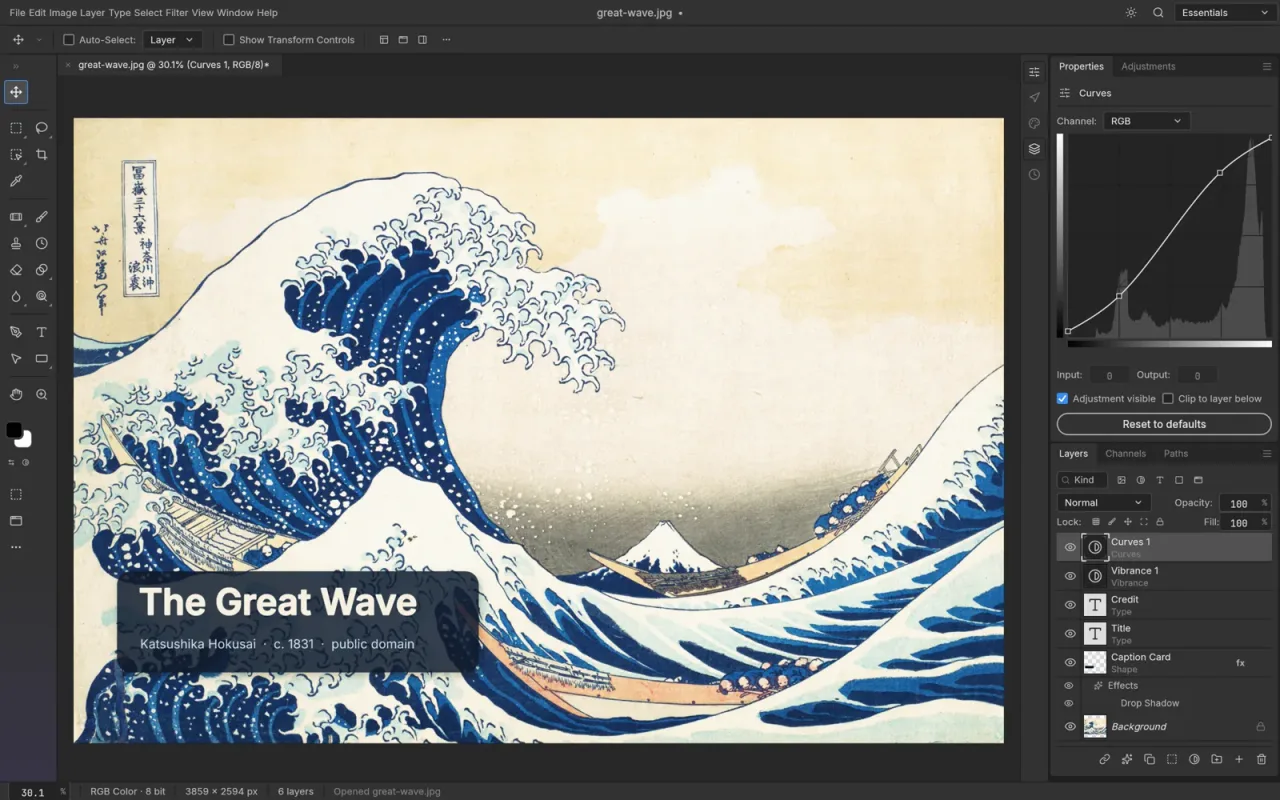
The official pitch is "the image editor you already know how to use." Menus, panels, tools, and shortcuts sit where Photoshop users expect them, from ⌘J to ⇧⌘D.
- Real PSD files. PhotoCraft opens, edits, and saves layered PSD and PSB documents. Re-saving keeps the same render for 307 of the 309 files in the public psd-tools test set, and all 116 shape layers in the team's PSD test files match Photoshop's pixels.
- Layers the way you know them. Groups, clipping masks, pixel and vector masks, fill layers, smart objects with smart filters, and layer styles such as Drop Shadow, Bevel & Emboss, Stroke, and gradient overlays.
- Non-destructive editing. 16 adjustment layers and more than 70 filters with live previews.
- 67 tools. Brushes, selections, retouching, the Pen tools, shapes, editable type, crop, and more.
- Serious color. RGB, CMYK, Lab, and Grayscale documents at 8, 16, and 32 bits per channel, with ICC color management and soft proofing.
- Many file formats. Besides PSD, it reads and writes layered TIFF and OpenRaster, opens Krita and Paint.NET files, places SVGs as vector smart objects, and handles PNG, JPEG, WebP, GIF, OpenEXR, HDR, and more.
- On-device selection. Select Subject and object selection run on your computer, not on a server.
- Automation. Every menu item and tool runs one of more than 500 commands, which a command-line tool (
photocraft-cli), a JSON control channel, and an MCP server can call. Scripts and AI agents can do anything you can click. - In your browser. The whole editor also compiles to WebAssembly, so you can try it in a browser tab.
The interface is available in several languages, including Japanese, Chinese, Korean, Spanish, and Russian.
What's new in PhotoCraft 0.8.2
Version 0.8.2 shipped on October 12, 2026, one day after 0.7.0, and credited 103 contributors. Highlights from the release notes:
- New tools: Artboard, Perspective Crop, Color Replacement, Freeform Pen and Curvature Pen, Add and Delete Anchor Point, and Horizontal and Vertical Type Mask.
- Rebuilt panel docking, shared with the other Crafting Apps, with saved workspaces.
- Speed fixes: finishing a brush stroke no longer freezes the app, and large feathered masks refresh faster.
- Photoshop-style details: Free Transform gets a right-click menu, tool options are remembered between launches, and crop presets can be saved.
New versions arrive every few days, so check the releases page for the latest.
How close is PhotoCraft to Photoshop?
The team publishes an unusually candid parity assessment against Photoshop 2026. The figures below are from October 12, 2026:
| Measure | PhotoCraft |
|---|---|
| Feature breadth (does each Photoshop feature exist?) | ~76% |
| Ready for real professional work | ~45% |
| Ready for someone who only needs the core features | ~61% |
In the team's words, PhotoCraft "is not yet a Photoshop replacement for daily professional work." The main gaps:
- Generative AI. There is no Generative Fill, Generative Expand, or Neural Filters. Only classical tools like Select Subject and Content-Aware fill.
- Plug-ins and scripting. No support for Photoshop
.8BFplug-ins or UXP and ExtendScript scripts. Actions (.atn) can be loaded and saved. - Performance. Very large or layer-heavy documents can be slow, and some users report brush lag.
- Stability. There are reports of freezes and GPU crashes on some machines.
- PSD exchange. Files usually round-trip, but some users report that Photoshop refuses files PhotoCraft saved.
Reviewers reached the same conclusion. Creative Bloq found PhotoCraft opened files without compatibility issues but had trouble with selection, masking, and filters.
PhotoCraft vs Photoshop and other free editors
| PhotoCraft | Photoshop | GIMP | Photopea | |
|---|---|---|---|---|
| Price | Free | Subscription | Free | Free with ads, paid ad-free plan |
| Open source | Yes | No | Yes | No |
| Photoshop-style layout and shortcuts | Yes | Yes | Partly | Yes |
| Layered PSD editing | Yes (alpha) | Native | Limited | Yes |
| Linux | Yes | No | Yes | In the browser |
| Maturity | Early alpha | Mature | Mature | Mature |
PhotoCraft's advantage is the combination: free, open source, native on every desktop, and built to feel like Photoshop. Its disadvantage is age. GIMP and Photopea are far more stable today.
How to install PhotoCraft
Option 1: the ArtCraft Launcher (easiest)
Download the ArtCraft Launcher from getartcraft.com/apps. It installs PhotoCraft and the other Crafting Apps, picks the right build for your computer, and keeps them updated.
Option 2: standalone installers
Get PhotoCraft on its own from the official PhotoCraft page or the GitHub releases page. Windows has
.msiinstallers and portable zips; macOS has a universal.dmg; Linux has an AppImage,.deb,.rpm, Flatpak, and tarball. The official site can lag a release or two behind GitHub.Option 3: the browser
PhotoCraft also has a web build, which is the quickest way to try it without installing anything.
Download only from official sources
PhotoCraft's popularity has attracted many unofficial websites. Some are harmless fan pages, but you should only download installers from getartcraft.com, the ArtCraft Launcher, or github.com/storytold/photocraft. Our safety guide explains how to spot fakes.
Who should try PhotoCraft now?
PhotoCraft is worth installing today if you want a free editor that opens your existing PSD files, work on Linux, or want to automate image editing with scripts or AI agents. If you edit for clients or on deadlines, keep Photoshop for now and check back as new releases land.
PhotoCraft and ArtCraft
PhotoCraft is one of thirteen Crafting Apps, alongside alternatives to Premiere Pro, Lightroom, Illustrator, and more. Our guide to ArtCraft's Adobe alternatives compares them all with Creative Cloud.
It is separate from ArtCraft, the team's AI image and video studio, which this site mainly covers. If you want AI generation with scene control, see the ArtCraft review.
Frequently asked questions
What is PhotoCraft?
PhotoCraft is a free, open-source image editor from the ArtCraft team, designed as a clean-room alternative to Adobe Photoshop. It is written entirely in Rust, opens and saves layered PSD files, and runs on macOS, Windows, Linux, FreeBSD, and in the browser.
Is PhotoCraft free?
Yes. PhotoCraft is free to download and use, with no account or subscription. Its source code is on GitHub and dual-licensed under MIT or Apache-2.0.
Is PhotoCraft made by Adobe?
No. PhotoCraft is made by the ArtCraft team, led by Brandon Thomas, and is not affiliated with or endorsed by Adobe. It follows Photoshop's layout and shortcuts so Photoshop users feel at home.
Can PhotoCraft replace Photoshop?
Not yet for daily professional work. PhotoCraft is in early alpha. Its own assessment rates it about 45% ready for real Photoshop work, with the biggest gaps in generative AI, missing tools, typography, performance, and plug-in support.
Can PhotoCraft open PSD files?
Yes. It opens and saves PSD and PSB files with layers, masks, adjustment layers, smart objects, layer styles, and editable type. The team reports that re-saving keeps the same render for 307 of the 309 files in the public psd-tools test set.
Does PhotoCraft have Generative Fill or other AI features?
Not yet. PhotoCraft has classical tools such as Select Subject, Select Sky, the Remove tool, and Content-Aware fill that run on your device, but no generative features like Generative Fill or Neural Filters.
Is PhotoCraft safe to download?
Yes, from the official sources: the PhotoCraft page on getartcraft.com, the ArtCraft Launcher, or the storytold/photocraft GitHub releases page. Avoid unofficial download sites.